

Password Protection
This page contains information about how you can manage the Password Protection function over the phone.
Overview
The Password Protection feature allows users with access to the interface (admin, service provider, organization, user, etc.) to block access to a phone terminal for a certain period of time, for example while the extension owner is out of office. The terminal can be blocked from the keypad by dialing a password defined in the interface. A blocked phone terminal cannot be used for placing or receiving calls. If the Voicemail feature is enabled, then all incoming calls of the extension will be redirected to voicemail while the phone terminal is blocked.
Set up Password Protection
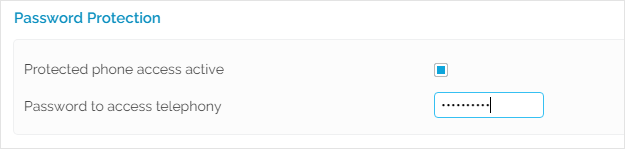 Screenshot: The Password Protection section of the Phone Terminal Setup page
In the VoipNow interface, follow the steps below:
- Choose the extension for which you want to configure this option and click the Phone Terminal Setup icon available in the Tools area.
- In the Setup Phone Terminal
<extension_label>page, scroll down to the Password Protection section. - To enable the feature, select the Protected phone access active checkbox.
- Define the Password to access telephony to be dialed from the terminal keypad in order to block its usage. The password must be a number with 3 up to 12 digits.
- The Currently access to phone is unrestricted message gets displayed next to the checkbox.
At this point, you can:
- Click the Block link to restrict the phone terminal usage; if access is restricted, the Currently access to phone is blocked message gets displayed
- Click the Unblock link to allow the extension user to dial calls normally.
Toggle Status via the Phone Terminal
You can activate the password protection option by dialing *11. As soon as the Password Protection feature is enabled in the interface, the Phone Terminal extension owner can toggle the terminal status either from the interface or the terminal. To block the phone terminal usage directly from the keypad, follow the steps below: If access to the phone terminal is blocked:
- Dial *11. The system requires a password.
- Dial the password defined in the interface. As soon as you enter the correct password, you will be able to normally dial out calls.
If access to the phone terminal is allowed:
- Dial *11. The system requires a password.
- Dial the password defined in the interface. As soon as you enter the correct password, the phone will be blocked.
""
Incoming calls are not redirected to Voicemail unless the required feature has been previously enabled.